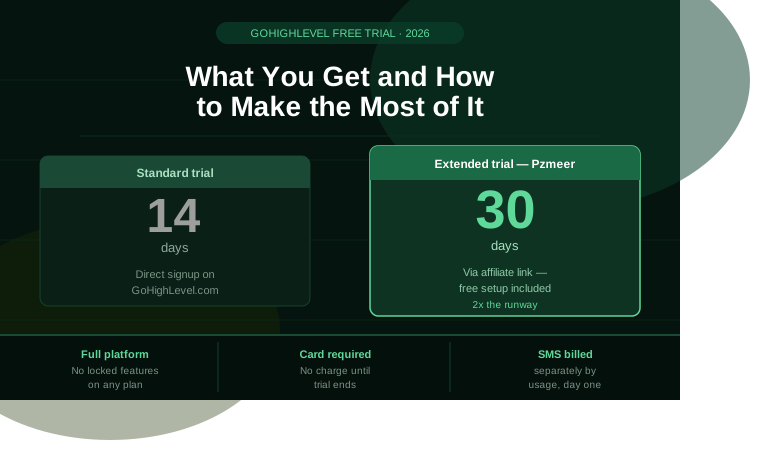
If you go to GoHighLevel’s website right now, you’ll see a 14-day free trial. That’s the standard offer everyone gets.
What most people don’t realize is that the trial — whether it’s 14 days or extended to 30 — gives you 100% full access to the platform. No watered-down version. No locked features. No “lite” dashboard. You get exactly what a paying customer gets, for free, until the billing clock starts.
The problem isn’t the trial itself. The problem is that most people waste it.
This guide covers exactly what the GoHighLevel free trial includes, the real difference between the standard 14-day and extended 30-day versions, what it actually costs to use during testing, the most common mistakes that cause people to misjudge the platform, and a day-by-day plan to get genuine, decision-ready value out of your trial — whether you have 14 days or 30.
How Long Is the GoHighLevel Free Trial?
The standard GoHighLevel free trial is 14 days. This is what you get by signing up directly through GoHighLevel’s main website. Every plan — Starter at $97/month, Unlimited at $297/month, and Agency Pro at $497/month — starts with this 14-day window.
An extended 30-day free trial is also available, but only through select partner and affiliate links — it is not offered on the standard signup page. This gives you double the time to properly configure and test the platform before any billing begins.
Why does this difference matter so much? Because GoHighLevel is not a tool you can meaningfully evaluate in an afternoon. Snapshots, pipelines, automations, and phone number registration all require real configuration time. 14 days is enough to explore the dashboard. 30 days is enough to actually build something and judge whether it works for your business.
Most businesses spend the first week of a 14-day trial just figuring out where things are. By the time they’re ready to test a real workflow, they’re already on day 8 or 9 — and the trial ends before they’ve seen a meaningful result.
What Does the GoHighLevel Free Trial Actually Include?
This is the most important thing to understand before you start: the trial is not a limited or “lite” version of the platform. Whatever plan you select at signup, you get full, unrestricted access to every feature included in that plan from day one.
During your trial, regardless of length, you have complete access to:
CRM and contact management — unlimited contacts, custom fields, tags, and contact records exactly as a paying account would have them.
Funnel and landing page builder — build and publish real, live sales funnels and landing pages. Not templates you can preview — actual pages you can publish and send traffic to.
Workflow automation — the full automation builder, including multi-step workflows, conditional logic, and triggers across email, SMS, and tasks.
Email marketing — send broadcast campaigns and build automated sequences using the same drag-and-drop builder paying customers use.
SMS and calling (LC Phone) — the infrastructure is available immediately, though usage is billed separately (more on this below).
Calendar and appointment booking — connect your calendar, configure booking pages, and set up confirmation and reminder sequences.
Pipeline management — build your sales pipeline stages and move contacts through them exactly as you would with a live business.
Reputation management — set up automated review request campaigns and connect your Google Business Profile.
Course and membership hosting — upload content and structure a course or membership area if your business model needs one.
The only features that vary by plan tier — not by trial status — are sub-account limits, white-label branding, and SaaS Mode. These are gated by which plan you select, not by whether you’re trialing or paying.
Starter vs. Unlimited vs. Pro — Which Plan Should You Trial?
Since your trial mirrors whichever plan you select, choosing the right one to test matters. The plan you should trial depends entirely on what you’re evaluating GoHighLevel for.
Trial the Starter plan ($97/month) if: you are testing GoHighLevel for your own single business. Three sub-accounts is more than enough to build and test a complete setup for one operation.
Trial the Unlimited plan ($297/month) if: you run a client services agency. You need unlimited sub-accounts to actually mirror your real operating environment — testing on Starter won’t show you what managing multiple clients actually feels like.
Trial the Pro plan ($497/month) if: you are evaluating GoHighLevel specifically as a SaaS product to resell under your own brand. SaaS Mode, white-label billing, and the branded client portal are only available at this tier. You cannot meaningfully test the resale model on Starter or Unlimited — the features simply aren’t there to test.
One important detail: most trial accounts do not allow switching plans mid-trial. Once you select Starter, Unlimited, or Pro at signup, you are generally locked into that tier for the trial period. Choose deliberately at the start rather than assuming you can change your mind on day 10.
What Is NOT Included for Free During the Trial
This is where most people get caught off guard, and it’s worth being completely transparent about it upfront.
SMS, calls, and email sending are usage-based, not included in the trial
The subscription itself is free during your trial — but every SMS you send, every call you make, and every email you send is billed at standard usage rates from day one. This is true for paying customers too; it’s just easy to forget when everything else feels “free.”
Typical usage costs during testing:
- SMS: approximately $0.008 per message segment
- Outbound calls: approximately $0.014 per minute
- Email: negligible at low volume, roughly $0.000675 per send
For genuine testing — sending test campaigns, trying out automations, making a handful of test calls — budget somewhere between $5 and $50 depending on how thoroughly you test. This is a realistic, small cost and should not be confused with a hidden fee. It is simply how the usage-based parts of the platform work, trial or not.
A2P 10DLC registration is required for SMS and is not instant
you plan to test SMS at all, this US carrier registration process typically takes 1 to 2 business days to clear. Submit this on day one of your trial — not day 10 — so SMS is actually functional while you still have time left to test it.
White-label domains are only available on Unlimited and Pro
you’re trialing Starter, you will not see this feature regardless of how long your trial runs.
SaaS Mode is exclusively a Pro-tier feature
You can see parts of the interface on lower plans, but the actual resale functionality — white-label billing, branded client portals — only activates on the $497/month tier.
Do You Need a Credit Card to Start?
Yes. GoHighLevel requires a valid payment method to activate any trial, standard or extended. This is consistent across every legitimate trial link, including affiliate-extended versions.
You will not be charged anything during the trial period itself. If you signed up for the standard 14-day trial, billing begins automatically on day 15 unless you cancel first. If you signed up through an extended 30-day link, billing begins on day 31.
Cancel any time before your trial’s final day and you will not be charged. There is no partial billing, no cancellation fee, and no penalty for cancelling cleanly before the trial converts.
What happens to your data if you cancel?
Your workspace becomes inaccessible once cancelled. If you decide to sign up again later, you generally start from scratch rather than picking up where you left off — so make your decision deliberately before the trial ends rather than cancelling impulsively and resubscribing later.
What happens if you do nothing?
Your trial automatically converts to a paid subscription on your selected plan, billed to the card you provided at signup. If you’re happy with the platform, this requires no action from you. If you’re not sure yet, set a reminder several days before the deadline — not the day before — so you have time to make a clear decision rather than a rushed one.
The Single Biggest Mistake People Make With Their Trial
The most common mistake, by a wide margin, is treating the trial like a product tour instead of an active build session.
Users who open every menu, click around the dashboard, watch a few tutorial videos, and never complete a single working workflow almost always conclude that GoHighLevel is “too complicated” or “overwhelming.” Users who build one complete sequence — a funnel connected to an automation connected to a calendar booking — in their first three days almost always conclude the platform is powerful and worth paying for.
The difference is not the platform. It is the approach.
GoHighLevel rewards focused building, not passive exploration. A half-explored dashboard tells you nothing useful about whether the platform fits your business. One fully working system — even a simple one — tells you everything.
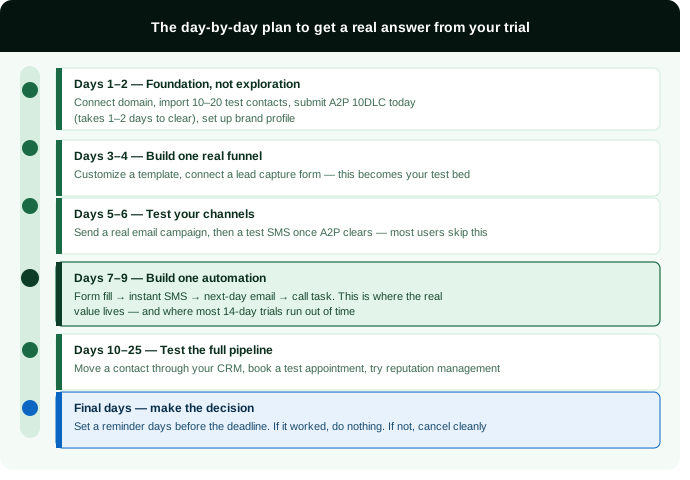
How to Make the Most of Your Trial: A Day-by-Day Plan
Whether you have 14 days or the extended 30, here is the structure that gets you to a genuine, informed decision instead of a vague impression.
Days 1–2: Foundation, Not Exploration
Complete your account setup. Connect your domain so your pages and emails look professional rather than using a generic GoHighLevel subdomain. Import a small test contact list — 10 to 20 contacts is enough — so you have real data to work with rather than an empty CRM.
Submit your A2P 10DLC registration today if you plan to test SMS at all. This takes 1–2 business days to clear, and starting it now means it will be ready by the time you actually need it.
Set up your business profile — logo, brand colors, business details — so everything you build during the trial actually looks like your brand, not a template.
Days 3–4: Build One Real Funnel
Create one funnel using a template rather than starting from a blank page. Customize the headline, the offer, and the core message — don’t aim for perfection, aim for understanding how the builder works and whether the output looks professional.
Connect a simple form to capture leads. This single funnel is what you’ll use to test everything else in the days that follow.
Days 5–6: Test Your Communication Channels
Send a real email campaign to your test contact list using the drag-and-drop builder. Check your open rates and delivery — this tells you immediately whether your domain and sending setup are configured correctly.
Once your A2P registration has cleared, send a test SMS through LC Phone. This is the step most trial users skip entirely — and it’s the one that reveals the platform’s real strength. A business that never tests SMS during its trial never sees the feature that often delivers the most value day-to-day.
Days 7–9: Build One Automation
This is where GoHighLevel’s actual value lives, and it’s the part most people run out of time for on a 14-day trial.
Build a single automated workflow: when a contact fills out your funnel form, trigger an immediate SMS, a follow-up email the next day, and a task reminder for you to make a personal call. This is a realistic example of the kind of sequence that replaces hours of manual follow-up work every week.
If building this automation feels intuitive, the platform will likely save you significant time long-term. If it feels confusing even after one attempt, that is genuinely useful information — not every business needs this level of automation complexity.
Days 10–12 (or Days 10–25 on an Extended Trial): Test the Full Pipeline
Move a test contact through your CRM pipeline from new lead to closed. Set up your calendar and book a test appointment to see the confirmation and reminder sequence in action. If you’re testing for agency use, create a second sub-account to see how client environments are managed separately from your own.
This is also the stage to test reputation management — set up an automated review request and confirm it sends correctly.
Final Days: Make the Decision
Set a calendar reminder several days before your trial ends — not the night before. Review what you actually built: did the funnel work, did the automation save real time, did the platform feel intuitive or did every step require a support article?
If the answer is genuinely positive, you don’t need to do anything — billing will begin automatically on your selected plan. If you’re not sure, this is the moment to either extend your evaluation by reaching out for support, or cancel cleanly before the deadline.
How to Make the Most of Your Trial: A Day-by-Day Plan
Based on how the platform is actually used across different trial accounts, certain profiles consistently get clear, decisive value from the trial period:
Freelancers and solo operators considering replacing multiple separate tools — Calendly, Mailchimp, a free CRM — with one consolidated platform see the cost and workflow benefits clearly within the first week of real testing.
Agencies evaluating whether to manage multiple clients under one system get the most accurate picture by trialing the Unlimited plan and setting up at least one full test client environment, not just their own.
Coaches and consultants testing funnels and appointment booking specifically should focus their entire trial on the funnel-to-calendar-to-automation sequence, since that combination is where most of the platform’s value shows up for service-based businesses.
SaaS resellers evaluating the white-label business model need to trial the Pro plan specifically — testing on a lower tier will not show the resale features that actually matter to that decision.
If you are only curious about the platform in a general sense, without a specific business workflow to test, the trial period — even the extended 30-day version — usually isn’t long enough to explore everything from a standing start. The trial rewards people who arrive with a specific use case in mind.
Frequently Asked Questions
Is the GoHighLevel free trial actually free?
The subscription cost is genuinely free during the trial period, whether 14 or 30 days. Usage-based charges — SMS, calls, and premium AI features — apply at standard rates from day one, but these are typically small amounts during normal testing, usually well under $50 total.
Do I need a credit card to start a GoHighLevel trial?
Yes, for every legitimate trial path, standard or extended. You are not charged anything until the trial period ends, and you can cancel any time before that point without being billed.
Can I get more than 14 days?
Yes. While the default trial on GoHighLevel’s main website is 14 days, an extended 30-day trial is available through select affiliate and partner links. The extended version gives you the same full platform access — simply with double the time before billing begins.
Can I switch plans during my trial?
Generally, no. Once you select Starter, Unlimited, or Pro at signup, most trial accounts lock you into that tier for the trial period. Choose the plan that matches what you’re actually evaluating before you start.
What happens to my work if I cancel before the trial ends?
You won’t pay anything, but your workspace becomes inaccessible once cancelled. If you decide to sign up again later, you typically start fresh rather than resuming your previous setup — so make your decision deliberately rather than cancelling on impulse.
Is SaaS Mode available during the trial?
Yes, but only if you trial the Pro plan specifically. SaaS Mode, white-label billing, and the branded client portal are not available on Starter or Unlimited, regardless of trial length.
What's the most common reason people misjudge GoHighLevel during their trial?
Treating the trial as a passive product tour rather than an active build session. Exploring every menu without completing a single working funnel-to-automation sequence almost always leads to the conclusion that the platform is overwhelming. Building one complete system in the first few days almost always leads to the opposite conclusion.
Get the Extended 30-Day Trial Through Pzmeer — Plus Free Setup
Here is the most practical way to apply everything in this guide.
When you sign up for GoHighLevel through Pzmeer’s affiliate link, you get the extended 30-day trial instead of the standard 14 — giving you the full runway this guide describes, rather than racing against a two-week clock.
On top of the extended trial, we include:
✅ Free custom landing page — built inside your trial account in your first 48 hours, so you start day three with a working funnel instead of a blank template ✅ Free technical setup support — domain connection, A2P 10DLC registration submitted immediately, email deliverability configured correctly from day one ✅ Free CRM and pipeline configuration — your stages built and ready, so you’re testing a working system instead of an empty dashboard ✅ 30 days of priority support — direct help with any question, rather than relying on generic help articles alone
Most people spend their entire trial figuring out where things are. We configure the foundation in the first 48 hours so you spend your remaining time testing what a working system actually feels like — which is the only way to make a genuinely informed decision.
You pay exactly the same price as signing up directly with GoHighLevel. Our setup support is funded by the affiliate commission, at zero additional cost to you.
👉 Claim Your Extended 30-Day GoHighLevel Trial + Free Setup
After signing up, message us at Pzmeer.com with your business type and what you’re hoping to test — we’ll have your foundation built within 48 hours.
Pzmeer is a web design and digital marketing agency helping small businesses, agencies, and coaches across the USA build their online presence and marketing systems. We provide free GoHighLevel setup support to clients who sign up through our affiliate link. Disclosure: this article contains affiliate links. If you sign up through our link, we receive a commission at no additional cost to you.