Your website is either your most effective salesperson — working 24 hours a day, seven days a week, converting visitors into leads and customers while you sleep — or it is quietly costing you business every single day without you knowing it.
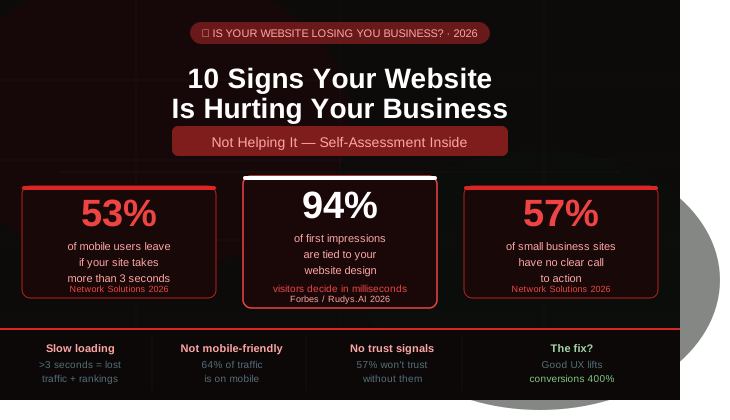
94% of first impressions are tied to website design. A one-second delay in load time can reduce conversions by up to 20%.
Businesses with websites are 2.8x more likely to grow revenues. 81% of shoppers research online before making a purchase.
Most business owners assume their website is doing its job. The ones losing business to a competitor with a better site almost never trace it back to the website. They blame the market, the economy, the season — anything except the digital front door that potential customers quietly walked away from before ever making contact.
This guide covers the ten signs that your website is working against you — with specific, actionable fixes for each one. If you recognise more than three of these in your current site, a professional audit or rebuild should be at the top of your priority list.
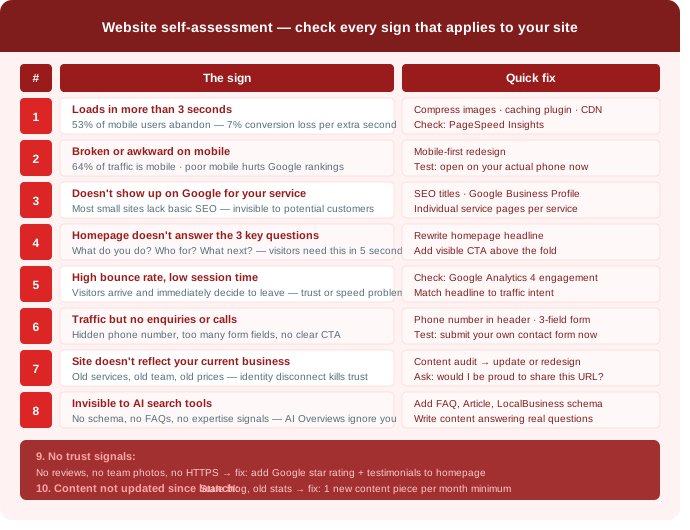
Sign 1: Your Site Takes More Than 3 Seconds to Load
This is the single most damaging and most common website problem for small businesses in 2026.
53% of mobile users abandon a website that takes more than 3 seconds to load. Conversion rates drop by roughly 7% for every additional second of page load time.
A load time increase from 1 to 3 seconds raises bounce rates by 32%.
The visitors you’re losing to a slow website never announce themselves. They don’t send you an email saying “I tried to visit your site but it was too slow.” They just leave, silently, and find a competitor whose page loaded before yours finished. You never know they were there.
The most common causes of slow load times: oversized images that were never compressed before uploading, too many plugins running simultaneously (particularly on WordPress), cheap shared hosting that runs slowly during peak traffic periods, and JavaScript that loads before the page content can be displayed.
How to check: Go to Google’s PageSpeed Insights (pagespeed.web.dev) and enter your URL. It shows your real-world load time from actual users and tells you exactly what’s causing the slowness. Your Largest Contentful Paint should be under 2.5 seconds.
How to fix it: Compress all images using TinyPNG or ShortPixel before uploading. Install a caching plugin on WordPress (WP Rocket or W3 Total Cache). Enable a Content Delivery Network — Cloudflare’s free tier works well for most small business sites. Remove any plugins you’re not actively using.
Sign 2: Your Site Looks Broken or Awkward on a Phone
In 2026 mobile devices account for approximately 64% of all global web traffic. If your website requires users to pinch, zoom, or scroll horizontally to read content, they will leave and go to a competitor.
57% of small business websites are not fully mobile-optimized. 57% of consumers won’t recommend a business with a poorly designed mobile site.
Google uses mobile-first indexing — your mobile version is what determines your search rankings, not your desktop version. A site that looks professional on a laptop but frustrates users on a phone is hurting both your conversion rate and your Google rankings simultaneously.
Signs your mobile experience is broken: text is too small to read without zooming, buttons are too small to tap accurately, content is wider than the screen and requires horizontal scrolling, images overflow their containers, forms are difficult to complete on a touchscreen.
How to check: Pull up your website on your actual phone right now. Try to find your phone number, read your main service description, and fill out your contact form. If any of those steps is frustrating, your mobile experience needs work.
How to fix it: A mobile-first redesign where every element is built for small screens first and then progressively enhanced for desktop. Not the other way around.
Sign 3: Your Site Doesn't Show Up When You Search for Your Own Services
If you can’t find your business on Google when you search for your own service plus your city, your customers can’t either. That is one of the strongest signs your website is hurting your business.
Most small business websites lack basic SEO, making them invisible on Google.
Search engine visibility is not automatic. A website that exists but has no SEO — no title tags, no meta descriptions, no structured headings, no local schema markup, no Google Business Profile — is essentially invisible to the people most likely to need your services.
The most common SEO failures on small business websites: page titles that say “Home” or the business name instead of the service and location, no meta descriptions, no H1 headings on key pages, no Google Business Profile, no local schema markup telling Google what city you serve, no individual pages for individual services.
How to check: Open a private/incognito browser window and search “[your service] [your city]” — for example “plumber Chicago” or “web designer Dallas.” Do you appear on page one? In the map pack? If not, your SEO needs immediate attention.
How to fix it: Install an SEO plugin (RankMath or Yoast on WordPress), set meaningful page titles and meta descriptions for every page, claim and fully complete your Google Business Profile, create individual pages for each service you offer, and make sure your business name, address, and phone number are consistent across your website and every online directory.
Sign 4: Your Homepage Doesn't Answer the Three Questions Every Visitor Has
If your homepage doesn’t answer “What do you do?”, “Who is this for?”, and “What should I do next?” within five seconds, you’re losing leads.
57% of small business websites lack a clear call to action on their homepage.
Visitors arrive at your homepage with zero context about your business. They came from a Google search, a social post, or a referral link. They have a problem and they’re trying to figure out — within seconds — whether you solve it.
If your homepage leads with your company history, your mission statement, or a generic welcome message, you’ve answered the wrong questions. The visitor needs to know immediately: what do you do, who you do it for, and what they should do right now to get started.
How to check: Ask someone who has never seen your website to look at your homepage for five seconds, then close it. Ask them what the business does, who it helps, and what they would do next. If they can’t answer all three confidently, your homepage message isn’t working.
How to fix it: Rewrite your homepage headline to state your specific offer and who it’s for. Add a visible call to action above the fold — “Book a Free Consultation,” “Get a Quote,” “Call Us Now.” Make the next step impossible to miss.
Sign 5: Your Bounce Rate Is High and Session Time Is Low
A high bounce rate — visitors leaving after viewing only one page — and a low average session duration together tell a clear story: people are arriving at your site and immediately deciding it’s not what they’re looking for.
A website that isn’t performing well can quietly hurt your growth by driving visitors away before they ever become customers.
The causes vary: your page loaded slowly so they left before it finished, your headline didn’t match the ad or search result that brought them there, your site looked outdated or untrustworthy, they couldn’t find what they were looking for quickly enough, or your content didn’t speak to their specific situation.
How to check: Connect your site to Google Analytics 4 (free) and check your engagement rate for key pages. Look at which pages have the highest bounce rates and shortest session durations — those are your priority pages to improve.
How to fix it: Match your page headline to the intent of the traffic arriving on that page. Improve your page load speed. Add relevant internal links to keep visitors exploring. Make your value proposition clear within the first two scrolls of any key page.
Sign 6: You're Getting Traffic But No Enquiries or Calls
This is one of the most frustrating situations a business owner can be in — you can see visitors arriving on your website, but the phone doesn’t ring and the enquiry form stays empty.
If your site is getting traffic but no one is filling out forms or calling your business, you have a conversion problem. This is often due to poor navigation, hidden contact information, or a lack of clear calls to action.
Traffic without conversion means something about your site is creating friction between a visitor’s intent and the action you want them to take. Common culprits: your phone number isn’t visible on mobile, your contact form has too many fields, your call to action is buried below the fold, your form doesn’t work on mobile, or there’s no clear reason for a visitor to choose you over a competitor.
How to check: Submit your own contact form right now. Does it work? Does it send you a confirmation? Is it easy to complete on a phone? Then check: is your phone number visible in your header on mobile?
How to fix it: Move your phone number to the header on every page as a clickable link. Reduce your contact form to three fields maximum (name, email, message or phone). Add a strong, specific call to action above the fold on your homepage. Consider adding a live chat or AI chat widget for visitors who prefer not to call.
Sign 7: Your Website Looks Nothing Like Your Current Business
Your website should reflect what you sell now, not what you were doing in 2020. If your LinkedIn profile looks like a modern professional while your site looks like a digital fossil, your identity is split. This inconsistency makes people wonder which version of your business is the real one.
Many businesses evolve over time, adding new services, expanding their offerings, or repositioning their brands. If your website still reflects where your business was several years ago rather than where it is today, it may no longer support your growth.
Your website and your business’s current reality need to match. Services you no longer offer, staff who have left, prices that are out of date, a brand style that no longer matches your materials — all of these create a disconnect that erodes trust.
If you hesitate to send prospects to your website, it likely means something about it no longer reflects your business. Your website should be something you are proud to show — not something you hope clients overlook.
How to check: Ask yourself honestly: if a prospect you were meeting tomorrow looked at your website tonight, would it make them more or less confident about working with you?
How to fix it: Start with a content audit — go through every page and update anything that no longer reflects your current services, team, or positioning. If the design itself is the problem, that requires a redesign rather than a content update.
Sign 8: Your Site Isn't Visible to AI Search Tools
One of the biggest shifts happening in digital marketing today is the rise of AI-powered search. Search engines are increasingly using artificial intelligence to summarise information, answer questions, and determine which websites are most authoritative. If your site lacks clear structure, helpful content, and strong expertise signals, AI systems may ignore it — or worse, misinterpret it.
AI, voice search, and personalisation are reshaping what a small business website needs to deliver. 50% of all searches will be voice searches by 2026.
Google’s AI Overviews, ChatGPT Search, and Perplexity now sit between your content and your potential customers. Sites that lack schema markup, FAQ sections, clear author information, and well-structured content are invisible to these tools — even if they rank reasonably well in traditional search.
Websites that perform best in AI search typically have: structured data markup, comprehensive FAQ sections, clear author information and credentials, well-organised content with descriptive headings, and strong topical authority in a specific subject area.
How to check: Search for a question your customers commonly ask that your website should answer. Does your website appear in Google’s AI Overview response? Ask ChatGPT or Perplexity who the best provider of your service is in your city. Are you mentioned?
How to fix it: Add FAQPage schema markup to any page with questions and answers. Add Article schema to your blog posts. Add LocalBusiness schema with your full contact details. Write comprehensive content that answers specific questions your customers search for.
Sign 9: Your Site Has No Trust Signals
97% of consumers read reviews for local businesses. Only 11% of users correctly understood what the padlock icon actually means — yet visitors still associate HTTPS security, customer reviews, and polished website design with trust and credibility.
57% of consumers won’t trust a business without a website. 81% of internet users are more likely to buy from a business with a professional website.
Trust is built before a visitor ever contacts you. The elements that build it: Google star rating and review count displayed prominently, client logos or “as seen in” press mentions, specific testimonials with full names and photos rather than generic quotes, case studies or before-and-after examples, professional team photography, and certifications or accreditations relevant to your industry.
The elements that destroy trust: stock photos that feel generic and impersonal, an outdated copyright year in the footer, missing or hard-to-find contact information, a non-HTTPS URL (the “Not Secure” warning in Chrome destroys visitor confidence instantly), and no social proof of any kind.
How to check: Look at your site through the eyes of someone who has never heard of your business. What evidence do they see that you are credible, experienced, and trustworthy? If the answer is “not much,” that needs to change.
How to fix it: Add your Google review count and star rating to your homepage. Embed three specific client testimonials with names. Add a team photo. Ensure your site is on HTTPS — no exceptions. Update the copyright year.
Sign 10: Your Content Hasn't Been Updated Since Launch
57% of small businesses don’t update their website content regularly. Many underperforming websites contain pages that haven’t been updated in years. Thin content fails to demonstrate expertise and can hurt search visibility.
Google rewards websites that demonstrate consistent expertise and freshness. A blog that was last updated in 2022, service pages with no indication of when they were written, statistics that reference 2019 data — all of these signal to both visitors and search engines that your business is not keeping pace.
Beyond SEO, stale content creates a trust gap. A prospective client who visits your site and finds a blog full of posts from three years ago wonders: does this business still operate? Are these services still available? Are these prices current?
Regular content updates — a monthly blog post answering questions your customers ask, quarterly updates to service pages with current statistics, and annual audits of every page’s accuracy — compound over time to build authority and search visibility.
How to check: When was the last time you published new content on your site? When was the last time you updated your core service pages? Check your Google Search Console — are you ranking for any search queries? Growing or declining?
How to fix it: Commit to one new piece of content per month — a blog post, a case study, or an updated service page. Each one is a permanent asset that works for you indefinitely once published.
How Many of These Apply to Your Site?
Here’s a quick self-assessment:
| Sign | Does This Apply to Your Site? |
|---|---|
|
Loads in more than 3 seconds |
Yes / No |
|
Broken or awkward on mobile |
Yes / No |
|
Doesn’t show up in Google for your services |
Yes / No |
|
Homepage doesn’t answer the three key questions |
Yes / No |
|
High bounce rate, low session time |
Yes / No |
|
Traffic but no enquiries |
Yes / No |
|
Doesn’t reflect your current business |
Yes / No |
|
Invisible to AI search tools |
Yes / No |
|
No visible trust signals |
Yes / No |
|
Content not updated since launch |
Yes / No |
0–2: Your site is in reasonable shape. Focus on the specific issues identified.
3–5: Your website has meaningful gaps that are likely costing you leads. A professional audit is worth the investment.
6–10: Your website is actively working against your business. A redesign should be a priority — the cost of inaction is higher than the cost of fixing it.
What It Costs to Fix vs. What It Costs to Ignore
Most business owners delay website improvements because they’re focused on the cost of the fix. The more useful calculation is the cost of doing nothing.
A one-second delay in load time reduces conversions by up to 20%. For a business generating 50 enquiries per month from their website, a 20% reduction means 10 fewer enquiries. At an average client value of $1,500, that’s $15,000 in missed revenue per month — from a load time problem that often costs a few hundred dollars to fix.
Strong UX can improve conversion rates by up to 400%. That is not a margin improvement. That is a business transformation — from the same amount of traffic, with no additional advertising spend.
The fixes for most of the ten signs above range from free (checking your own site on your phone) to $500–$5,000 for a professional audit and targeted improvements. A full redesign for a small business typically runs $1,500–$5,000 at Pzmeer — and consistently pays for itself within months through improved lead volume.
Frequently Asked Questions
How do I know if my website is hurting my business?
The clearest indicators are: your phone doesn’t ring despite having a website, you’re getting website traffic but no enquiries, you cringe when sending someone your URL, you haven’t updated the site in over a year, and the site looks significantly different on a phone than on your desktop. Any two of these together warrant a professional audit.
How long does a website redesign take?
A simple five to eight page business website typically takes two to four weeks from kickoff to launch. A more complex site with fifteen or more pages, custom functionality, or e-commerce takes four to eight weeks. The main delay in most projects is content gathering from the client — having your copy, images, and service descriptions ready before the project starts significantly accelerates the timeline.
Can I fix these issues myself?
Some of them. Updating your content, checking your Google Business Profile, installing a caching plugin, and compressing your images are all DIY-friendly. Structural SEO issues, mobile responsiveness problems, and conversion rate optimisation typically require professional expertise to diagnose and fix correctly — especially if you want the fix to stick rather than creating new problems.
Will redesigning my website hurt my Google rankings?
Not if it’s done correctly. A redesign that improves your site’s speed, mobile experience, and content quality typically results in improved rankings over time. The key is implementing 301 redirects for any URLs that change, maintaining your existing content, and not changing your site structure unnecessarily during the rebuild.
How much does a professional website audit cost?
Professional website audits typically cost $200–$800 depending on the size and complexity of your site. At Pzmeer, we offer a free initial website review — we’ll identify the specific issues costing you leads and give you a clear priority list before you commit to any paid work.
Get Your Website Working for Your Business — Not Against It
Your website should be your best salesperson. If it isn’t, every day you wait is another day of lost leads.
At Pzmeer.com, we build and rebuild websites for US small businesses — converting underperforming sites into consistent lead generators at prices that make sense for independent businesses.
✅ Free initial website review — we identify your specific issues first
✅ Professional redesign from $1,500 for small business sites
✅ Mobile-first, fast-loading WordPress builds
✅ Local SEO setup from day one
✅ Google Search Console and Analytics connected
✅ SSL, domain, and hosting configuration included
✅ GoHighLevel integration available for automated lead follow-up
👉 Get your free website review at Pzmeer.com — we identify exactly what’s holding your site back and what to fix first. No pressure, no obligation.
Pzmeer is a full-service web design and digital marketing agency helping small businesses across the USA build professional websites that generate consistent leads. Our services include custom web design, WordPress development, local SEO, GoHighLevel setup, and digital marketing.