
Most business owners launch a WordPress website, look at it once it’s live, and assume the job is done.
It isn’t. Not even close.
A WordPress website is not a brochure you print once and forget about. It is a piece of live software, built from a core platform plus dozens of plugins and a theme — every single one of which gets updated regularly, and every single one of which can become a security hole the moment you stop applying those updates.
This guide explains exactly what happens when WordPress maintenance gets neglected — the security risks, the performance decline, the SEO damage, and the very real financial cost of waiting until something breaks. Then it covers what proper maintenance actually involves and what it costs to do it right.
If you’ve never thought about this since your site launched, this article will change how you think about it by the end.
Why WordPress Is Such a Common Target
WordPress powers 42.5% of all websites globally as of 2026 — nearly nine times the reach of its nearest competitor, Shopify, which sits at 5.1%. Roughly four out of every ten websites you visit on any given day runs on WordPress.
That scale is exactly why it’s targeted so heavily. Hackers don’t go after WordPress because the platform is uniquely weak. They go after it because the sheer number of WordPress sites makes it the most efficient possible target for automated attacks. Build one piece of attack software, point it at the entire internet, and a meaningful percentage of what it finds will be running WordPress.
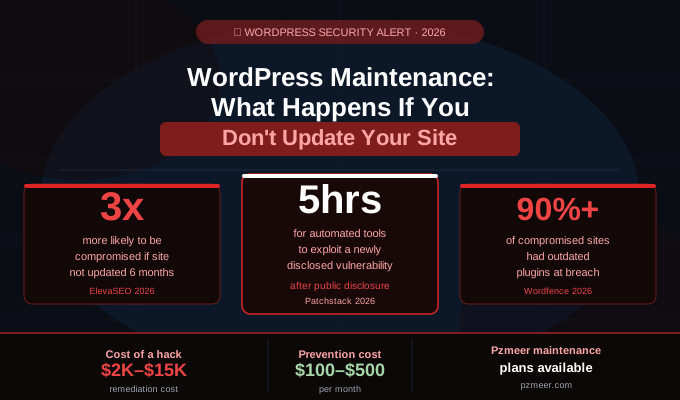
The numbers on how fast this moves are sobering. 11,334 new vulnerabilities were discovered across the WordPress ecosystem in 2025 alone — a 42% increase from the previous year. Automated attacks can scan for and exploit a newly disclosed vulnerability within just 5 hours of it becoming public.
Five hours. Not five weeks. Five hours.
If your plugins are even a few weeks out of date when a vulnerability is disclosed, you are not behind by a small margin. You are sitting exposed for the entire window between disclosure and whenever you eventually get around to updating.
It's Not WordPress Itself — It's What's Installed On Top of It
Here’s a detail that surprises a lot of business owners: WordPress core software is not where most of the risk lives.
91% of WordPress security risks originate in plugins, not the core platform itself. Outdated plugins and themes are responsible for more than 90% of compromised WordPress sites. Of the new vulnerabilities discovered in 2024, 96% originated in plugins rather than WordPress core.
This matters because it changes where your attention needs to go. Updating WordPress core itself, while important, is genuinely the easy part — it’s usually one click and well-tested before release. The real maintenance burden, and the real risk, sits in the contact form plugin you installed three years ago and never thought about again. The SEO plugin. The page builder. The gallery plugin you added for one project and forgot to remove.
Every plugin on your site is a separate piece of software, built and maintained by a separate developer, with its own update schedule and its own security track record. A site running 15 plugins is running 15 separate pieces of software that all need to stay current — and the math on risk compounds with every one you add.
What Actually Happens When You Stop Updating
This is not abstract risk. Here is the concrete, sequential reality of what happens to a WordPress site that stops receiving regular maintenance.
Security Exposure Accelerates Immediately
A site not updated for 6 months is three times more likely to be compromised than one on a regular update schedule. This is not a gradual decline — it compounds. Each missed update doesn’t just add one vulnerability. It adds a vulnerability on top of every previous vulnerability still sitting unpatched, while automated bots run constant, low-effort scans across the entire web specifically looking for sites in exactly this state.
Automated bots constantly scan for sites running outdated plugins, old PHP versions, and default login URLs — anything that signals neglect. They are not targeting you specifically. They are targeting the pattern. An outdated WordPress install is the pattern.
One detail that catches business owners off guard every time: hackers don’t target sites based on traffic. A low-traffic site running outdated plugins is just as exposed as a high-traffic one. “Nobody would bother hacking my small business site” is one of the most common — and most incorrect — assumptions in web security. Automated attacks don’t check your analytics before deciding whether you’re worth targeting.
Your Site's Speed Degrades — Quietly, At First
Performance decline from neglected maintenance doesn’t announce itself. A bloated database, unoptimized images, and stale cache settings accumulate slowly and silently. The site owner rarely notices the drift themselves — their visitors feel it before they do.
Google has confirmed that 53% of mobile visitors leave a site that takes more than 3 seconds to load. A site that has gone six months without maintenance has, in nearly every case, drifted well past that threshold without anyone at the business realizing it.
This is lost revenue that never shows up as a single dramatic event. It shows up as a slow, steady decline in conversions that’s nearly impossible to diagnose after the fact, because there’s no specific moment you can point to and say “that’s when it broke.” It just got worse, gradually, for months.
Search Rankings Slip
Search engines factor site speed, broken links, HTTPS status, and crawl errors directly into ranking decisions. A site that’s been left alone for six months tends to accumulate problems in exactly these areas — and Google notices before most business owners do.
A neglected site bleeds quietly. Search rankings slip. A form stops working and nobody notices for weeks. The damage compounds because each of these problems makes the others worse — a slower site gets crawled less frequently, which means fixes (when they finally happen) take longer to register with search engines, which extends the ranking damage even after the underlying issue is resolved.
Something Breaks — And Nobody Notices Right Away
A contact form that silently fails is one of the most common issues found on sites that haven’t been actively maintained. It doesn’t throw an error. It doesn’t notify anyone. It just stops working, and every lead who tries to use it from that point forward simply disappears — with no record that it ever happened.
This is the scenario that should genuinely worry any business owner relying on their website for leads: the system can be quietly broken for weeks before a customer mentions it, or worse, before nobody mentions it at all because the prospective customer simply assumed you never got back to them and went elsewhere.
Backups Quietly Stop Working
The backup that was supposed to run still doesn’t get checked. A backup configuration can drift or fail silently in exactly the same way a contact form can — and the only way you discover it’s broken is in the worst possible moment, when you actually need to restore from it and discover there’s nothing there.
An off-server backup — one stored in a separate location from your hosting environment — is the only kind that protects you if your host itself has an issue. A backup sitting on the same server as the site it’s backing up doesn’t help you if that server goes down or gets compromised.
What It Costs to Fix vs. What It Costs to Prevent
This is the comparison that makes the case for maintenance impossible to argue with.
The cost of recovering from a hack:
The average cost of remediating a WordPress hack is estimated between $2,000 and $15,000, depending on severity. That range typically includes emergency cleanup, identifying and closing the vulnerability that was exploited, restoring from backup (if one exists and actually works), and the SEO recovery work needed if Google blacklisted the site during the compromise — which it frequently does.
The cost of recovery time:
With regular backups and updates in place, a compromised site can typically be restored within a couple of hours. Without them, recovery can take days. In the worst cases, full recovery is impossible, and the business effectively has to rebuild from nothing.
The cost of prevention:
Ongoing WordPress maintenance — updates, backups, security monitoring, and performance checks — typically costs $100 to $500 per month depending on site complexity, when handled professionally. Applying security patches proactively can prevent up to 96% of the issues that stem from outdated plugins in the first place.
Run the comparison again. $100–$500 a month in prevention versus $2,000–$15,000 in emergency remediation, plus days of downtime, plus whatever SEO and reputation damage happens in the meantime. This is not a close call.
What Proper WordPress Maintenance Actually Involves
Maintenance is not a single task you complete once. It’s an ongoing discipline broken into a few different timeframes.
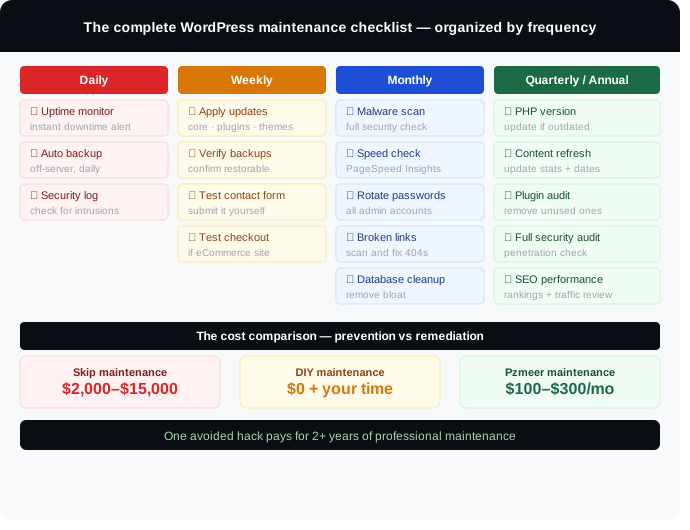
Daily Tasks (5–10 minutes, largely automatable)
- Uptime monitoring — tools like UptimeRobot or Jetpack Monitor alert you the instant your site goes down, rather than finding out from a customer complaint
- Incremental backups — automated daily backups of database and file changes, ideally stored off-server
- Security log review — a quick check for suspicious login attempts or security plugin alerts
Weekly Tasks (30–60 minutes)
- Apply pending updates — core, plugin, and theme updates, always preceded by a backup. Outdated plugins are the single most common cause of hacked WordPress sites, and the fix is frequently just running a pending update that’s already available
- Backup verification — confirm your backups are actually complete and restorable, not just running
- Test core functionality — submit your own contact form, and if you run a store, complete a test checkout. This five-minute habit is the difference between catching a broken form yourself and discovering it from a customer complaint
Monthly Tasks (30–45 minutes)
- Security scan — checking for malware, unexpected file modifications, and unknown admin accounts
- Performance review — checking page speed and addressing database bloat before it compounds further
- Password rotation — forcing a reset on administrative accounts at least monthly, with strong, unique passwords
- 404 and broken link check — scanning for missing pages that quietly damage both user experience and SEO
Quarterly and Annual Tasks
- PHP version check — most business owners never think about which PHP version their site runs on. Running an outdated PHP version means running software that stopped receiving security patches years ago. This is usually a one-click fix in your hosting control panel, but only if someone checks for it
- Content and SEO refresh — updating statistics, refreshing screenshots, and confirming target keywords still match actual search intent. Pages that have dropped in rankings often just need a content refresh rather than a full rewrite
- Form and conversion testing — a full test of every form and conversion path on the site, not just the contact form
DIY vs. Professional WordPress Maintenance
Managing maintenance yourself is genuinely viable for some businesses, and genuinely risky for others. Here’s an honest breakdown of what each path actually requires.
Handling it yourself works when:
- Your site is simple — a handful of pages, minimal plugins
- You have the time to commit to a real weekly and monthly routine, not just good intentions
- You’re comfortable reading changelogs, testing updates, and diagnosing what broke after a specific change
Handling it yourself becomes risky when:
- You don’t have the bandwidth to stay current on which vulnerabilities are actively being exploited
- You can’t tell which plugin updates are safe to apply immediately and which need staging-site testing first
- Your business depends on the website for leads, bookings, or sales, and any downtime has a direct revenue cost
- You genuinely don’t know what PHP version your site is running right now
Managing your own WordPress maintenance means staying current on security vulnerabilities, knowing which updates are safe to apply immediately versus which need testing first, diagnosing why performance degraded after a specific change, and knowing how to actually restore from a backup when something goes wrong — not just knowing a backup exists.
That last point trips up more business owners than any other. Having backups is not the same as knowing how to use them under pressure, at 11pm, when the site is actually down.
What WordPress Maintenance Costs in 2026
| Service Level | Monthly Cost | What's Included |
|---|---|---|
|
DIY (your own time) |
$0 + your time |
Everything above, self-managed |
|
Basic maintenance plugin |
$10–$30/month |
Automated backups + basic scanning only |
|
Professional maintenance plan |
$100–$300/month |
Updates, backups, security monitoring, uptime alerts |
|
Full-service maintenance + support |
$300–$500/month |
Everything above + performance optimization, priority support, monthly reporting |
For most small businesses generating real leads or revenue through their website, the $100–$300/month professional tier is the point where the cost is clearly justified by what it prevents — a single avoided hack pays for several years of maintenance on its own.
Why Pzmeer is a smart choice for ongoing WordPress maintenance:
At Pzmeer, we offer WordPress maintenance plans built specifically for US small businesses at rates 40–60% below typical US agency pricing — without cutting corners on the actual protection. Every plan includes core, plugin, and theme updates applied carefully (never blind auto-updates left unmonitored), off-server backups, monthly security scans, uptime monitoring, and quarterly performance reviews.
Common WordPress Maintenance Mistakes
Relying entirely on auto-updates with no monitoring.
WordPress can auto-update minor core releases by default, and you can enable auto-updates for plugins and themes. But auto-updates with nobody checking the result afterward just mean things can break silently instead of safely. Every update should be checked to confirm nothing broke.
Updating everything in bulk at once.
Updating in bulk saves a few minutes but makes it significantly harder to identify which specific update caused a problem if something breaks afterward. Update one at a time when possible, especially for major version changes.
Storing backups on the same server as the site.
If your hosting account is compromised or the server fails, a backup stored in the same place offers no protection at all. Off-server backups are the only kind that actually protect you in a real emergency.
Never checking backups actually work.
A backup that hasn’t been tested is a guess, not a safety net. Periodically confirm you can actually restore from it — not just that the backup file exists.
Treating World Backup Day as the only reminder.
Backup verification needs to happen continuously, not once a year when a calendar holiday reminds you.
Ignoring PHP version entirely.
Most site owners have never checked which PHP version their site runs on. An outdated PHP version running without security patches is a silent, ongoing risk that has nothing to do with WordPress itself and everything to do with the server environment underneath it.
Skipping the staging environment for major updates.
If your site is business-critical, testing major updates on a staging copy first — most quality hosts include one-click staging — catches conflicts before they affect your live site instead of after.
Frequently Asked Questions
What happens if I never update my WordPress site?
Risk compounds continuously. A site left unmaintained for six months is three times more likely to be compromised than a regularly maintained one. Beyond security, the site gradually slows down, search rankings decline, broken functionality goes unnoticed, and backups may silently stop working — all while the site looks fine on the surface to anyone who isn’t checking closely.
How often should WordPress be updated?
Security patches should be applied as soon as they’re released — attackers often target sites within days of a vulnerability being disclosed, and automated exploitation can begin within hours. As a baseline, check for and apply updates weekly, never going more than a week without checking core, plugin, and theme updates.
Is WordPress maintenance really necessary for a small, low-traffic site?
Yes. Hackers don’t target sites based on traffic volume — they target sites based on detectable vulnerabilities. A low-traffic site running outdated plugins is exactly as exposed as a high-traffic one, because automated attack tools don’t check analytics before scanning for weaknesses.
What's the single most important maintenance task?
Applying plugin and theme updates promptly, since 90%+ of compromised WordPress sites had outdated plugins at the time of the breach. A close second is maintaining verified, off-server backups, since they determine whether a compromise costs you a couple of hours or several days — or becomes unrecoverable entirely.
Can I just use a maintenance plugin and skip professional help?
Maintenance plugins can automate parts of the process, but they don’t replace judgment. Someone still needs to review what the plugin flags, decide which updates need staging-site testing first, and actually act on security alerts rather than letting them accumulate unread. For businesses without the time or expertise to do this consistently, professional maintenance closes that gap.
How much does it cost to recover from a WordPress hack?
Remediation typically costs between $2,000 and $15,000 depending on severity, and that figure doesn’t include the revenue lost during downtime or the SEO recovery work often needed afterward if the site was blacklisted during the compromise.
Protect Your Website Before You Need To Recover It
Your WordPress website is one of the most valuable assets your business owns online — and like any asset, it depreciates quickly without upkeep. The difference between a site that quietly compounds value over years and one that becomes an emergency is almost never luck. It’s a process.
At Pzmeer.com, we provide ongoing WordPress maintenance for US small businesses — updates applied carefully and monitored, off-server backups, monthly security scans, uptime monitoring, and performance reviews — at a price that makes sense for a small business, not just an enterprise.
- Core, plugin, and theme updates — applied and monitored, not just automated and ignored
- Off-server, verified backups
- Monthly security scanning
- 24/7 uptime monitoring
- Quarterly performance and PHP version checks
- Direct support when something needs attention
we respond within 24 hours.
Pzmeer is a full-service web design and digital marketing agency helping businesses across the USA build, maintain, and grow their WordPress websites. Our services include custom web design, WordPress development and maintenance, local SEO, and digital marketing.