Most dental practices in the USA have a website. Very few of them have a website that actually works.
There is a significant difference between having a website and having a website that consistently brings in new patients, builds trust before the first appointment, and converts visitors into booked consultations.
In 2026, a dental website is often the first and most important impression a patient has of a practice. Before they call your office, before they check your insurance, before they ask a friend — they visit your website. What they see in those first three seconds determines whether they book an appointment or click back to Google and choose a competitor.
This guide covers everything a dental practice website needs in 2026 to get more patients online — the must-have features, the design principles that build trust, the local SEO tactics that get you found, and what it realistically costs to get it built properly.
Why Your Dental Website Is Your Most Important Marketing Asset
Consider the patient journey in 2026. Someone experiences tooth pain on a Sunday evening. They pick up their phone and search “dentist near me accepting new patients.” Google shows them three local dentists. They tap on yours. Your website loads. What happens next determines whether you get a new patient or not.
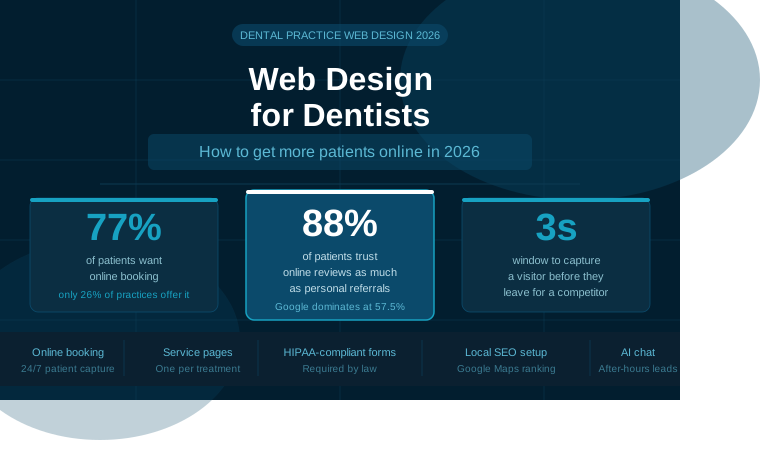
You have approximately 3 seconds to capture a visitor’s attention before they navigate to a competitor.
Three seconds. That is the entire window you have to communicate:
- That your practice is professional and trustworthy
- That you accept new patients
- What services you offer
- How to book an appointment
77% of patients want a provider that offers online booking and scheduling — but only 26% of dental practices currently offer it.
That gap is your opportunity. Three quarters of patients are actively looking for online booking. Only one in four practices provides it. If your website has online booking and your competitor’s doesn’t — you win that patient almost automatically.
The average landing page conversion rate for dental offices is approximately 10%. That means for every 100 people who visit your website, around 10 take action. The practices with the best-designed websites consistently outperform that average. The ones with outdated, slow, or confusing websites convert far less.
Your website is not a brochure. It is a patient acquisition system. And in 2026, it needs to be built accordingly.
The 10 Must-Have Elements for a Dental Practice Website in 2026
1. Mobile-First Design That Loads in Under 3 Seconds
Dental searches happen predominantly on mobile, and Google uses mobile-first indexing — making responsive design the foundation of every high-performing dental site.
Most patients searching for a dentist are doing it on their phone. They might be sitting in a waiting room, standing in their kitchen, or lying in bed at night when the toothache finally becomes too much to ignore. Your website must work flawlessly on a four-inch screen.
50% of consumers expect websites to load in 3 seconds or less. A dental website that takes 6 seconds to load on mobile has already lost half its potential patients before a single word is read.
What mobile-first dental web design means in practice:
- Every button — especially “Book Appointment” — is large enough to tap easily
- Your phone number is a clickable link (tap to call instantly)
- Your address opens Google Maps with a single tap
- Your menu navigation is clean and simple on small screens
- Images are compressed so they load fast on mobile connections
2. Online Appointment Booking — Available 24/7
This is the single biggest gap between what patients want and what most dental practices provide.
77% of patients want online booking — yet only 26% of practices offer it. That means the majority of patients who visit your website at 9pm on a Tuesday — when your front desk is closed — have no way to book an appointment. They either have to remember to call tomorrow (most won’t) or find a dentist who lets them book right now.
Your online booking system should:
- Be accessible directly from your homepage — not buried three pages deep
- Show real-time availability so patients can self-select their preferred time
- Allow new patient registration as part of the booking flow
- Send automatic confirmation emails and SMS reminders
- Reduce no-shows with automated reminder messages 24–48 hours before appointments
- Integrate with your practice management software if possible
The best dental websites of 2026 share this trait: real-time booking that connects directly to the practice management system. When a patient books online, it should appear immediately in your schedule — no manual entry, no callbacks to confirm.
3. Individual Service Pages for Every Treatment
One of the most powerful SEO strategies for dental practices is one most websites ignore completely: dedicated pages for every service you offer.
Think about how patients search. They do not search “dentist.” They search:
- “dental implants [city name]”
- “teeth whitening near me”
- “emergency dentist open Saturday [city]”
- “Invisalign provider [city name]”
- “root canal dentist near me”
If all of your services are listed on one page under a heading called “Services” — Google cannot rank you for any of those specific searches. You need individual pages for each treatment, optimised for local search.
The best dental websites of 2026 have dedicated SEO pages for each service.
Every service page should include:
- The treatment name and city in the page title and URL
- A clear description of what the treatment involves
- Who is a good candidate for it
- What patients can expect before, during, and after
- Your before-and-after photos if applicable
- A prominent “Book a Consultation” CTA
- Patient testimonials specific to that treatment
A dental practice offering 12 services should have 12 individual service pages. This is how you capture patients searching for specific treatments in your area.
4. Professional Photos of Your Team, Office, and Results
Invest in professional photos of your actual dentists, staff, and office space. Patients want to see who they will be trusting with their oral health.
Dental anxiety is real — practices that build trust with a warm, modern aesthetic and easy-to-navigate layout attract significantly more patients. Your photography is the fastest way to reduce that anxiety before a patient even walks through your door.
What your photography should include:
Team photos: Warm, approachable headshots of every dentist and key staff member. Patients are making a trust decision. Seeing a friendly, professional face reduces anxiety instantly. Adding videos of your practice and team in action helps prospective patients feel more comfortable and confident about choosing your office.
Office photos: Show your waiting room, treatment rooms, and equipment. A modern, clean, well-lit practice photographed professionally communicates quality and care before the patient visits.
Before-and-after gallery: For cosmetic treatments especially — veneers, whitening, Invisalign, implants — a compelling before-and-after gallery is one of the highest-converting elements on a dental website. Patient testimonials, before-and-after galleries strategically placed throughout your site dramatically increase conversion rates.
Avoid generic stock photos of people smiling with impossibly perfect teeth. Patients recognise stock photography immediately and it undermines trust rather than building it. Avoid generic dental stock photos that lack authenticity — professional authentic photography builds credibility.
5. Google Reviews Prominently Displayed
88% of consumers trust online reviews as much as personal recommendations. Embed your best Google reviews directly on your homepage and service pages where patients are making their booking decision — not on a separate testimonials page.
Google dominates the review landscape, accounting for 57.5% of all reviews worldwide. Consumers rely on Google reviews to find good dentist options, read reviews about patient care, and evaluate high ratings before booking appointments.
Your Google reviews should appear:
- In the hero section of your homepage (your star rating and total review count)
- On individual service pages (reviews specific to that treatment)
- On your new patient page (reassurance at the moment of highest hesitation)
- On your contact and booking pages (final confidence before committing)
Display your Google review rating and count prominently near the top — for example “4.9 Stars from 287 Google Reviews” with visual star icons. Repetition across multiple touchpoints reinforces credibility without feeling excessive.
Beyond displaying reviews, you need a system to consistently generate new ones. Automated review request messages sent after every appointment — via SMS or email — are the most effective approach. Practices using automated review requests consistently see their Google review count grow 3–5x within 90 days.
6. HIPAA-Compliant Contact Forms and Patient Intake
HIPAA-compliant forms are a must-have feature for the best dental websites in 2026.
Any form on your dental website that collects patient information — contact forms, appointment requests, new patient intake forms, insurance verification requests — must be HIPAA compliant. This means the data is encrypted in transit and at rest, and is not stored on third-party servers without a Business Associate Agreement.
Standard WordPress contact form plugins like Contact Form 7 are NOT HIPAA compliant by default. You need a dedicated HIPAA-compliant form solution.
What this means for your website:
- Use a dedicated HIPAA-compliant form service
- Display your Privacy Policy prominently and link to it from every form
- Include HIPAA compliance badges where appropriate to reassure patients
- Ensure your web hosting is also HIPAA-capable if you are storing any patient data on the server
This is not optional. Fines for HIPAA violations range from $100 to $50,000 per violation. A properly built dental website handles this correctly from day one.
7. A Clear, Trust-Building Homepage Structure
Maximum 6–7 main menu items prevents choice paralysis and decision fatigue. Too many navigation options overwhelm visitors and reduce action-taking.
Your homepage has one job: move the visitor toward booking an appointment. Every element should support that goal.
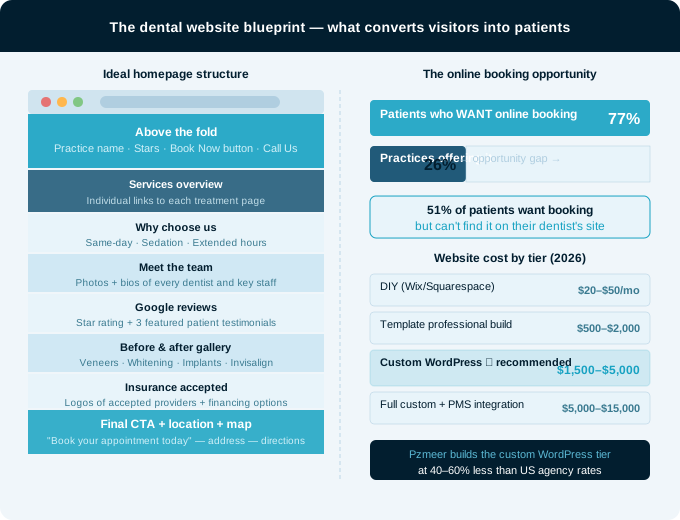
A high-converting dental homepage structure in 2026:
Above the fold (visible without scrolling):
- Your practice name and city
- A clear headline that speaks to the patient’s need — “Gentle, Modern Dentistry in [City Name]” or “New Patients Welcome — Book Online Today”
- Your Google star rating and review count
- Two clear CTAs: “Book Online” and “Call Us”
- Professional hero image of your team or office
Below the fold:
- Services overview with links to individual service pages
- Why choose us — your unique differentiators (same-day appointments, sedation dentistry, extended hours, etc.)
- Meet the team — brief bios and photos
- Patient testimonials — 3–5 of your best Google reviews
- Before-and-after gallery
- Insurance accepted
- Location map and directions
- Final CTA — “Book Your Appointment Today”
The call-to-action should be immediate and obvious, with above-the-fold clarity that makes it easy to take action, whether booking online or calling in to ask a question.
8. Local SEO — Getting Found When Patients Search
Having a great website means nothing if patients cannot find it. Local SEO for dental practices is what determines whether you appear when someone in your city searches for a dentist.
Google Business Profile: Your Google Business Profile is the most important local SEO asset you have. It controls your appearance in Google Maps and the local three-pack that appears at the top of search results. Make sure yours is:
- Fully completed with photos, services, hours, and a description
- Updated with new photos and posts regularly
- Responding to every review — positive and negative
- Listed with consistent name, address, and phone number across all directories
On-page local SEO:
- Include your city and neighbourhood name naturally throughout your website copy
- Page titles should follow this formula: “[Service] Dentist in [City] | [Practice Name]”
- Add schema markup so Google understands your business type, services, hours, and location
- Build individual location pages if you have multiple offices
Content marketing for SEO: Blog posts, treatment guides, and oral health resources position your practice as a trusted expert while improving search engine rankings and providing value to potential patients.
Publish regular blog content answering the questions your patients are actually asking:
- “How much do dental implants cost in [city]?”
- “What is the difference between a crown and a filling?”
- “How long does teeth whitening last?”
- “Is Invisalign covered by insurance?”
Each of these is a question real patients ask Google. Each one can be a blog post that ranks locally and drives new patient traffic to your website.
9. New Patient Special Offer and Clear CTAs
New patients are the lifeblood of a growing dental practice. Your website should actively incentivise first visits.
A new patient special offer — typically a discounted cleaning and exam, or a free consultation for cosmetic treatments — is one of the highest-converting elements a dental website can feature. Display it:
- In the hero section of your homepage
- On a dedicated New Patients page
- As a banner that appears across the top of every page
- In your Google Business Profile posts
Every page of your website should have a clear, visible call to action. Strategic trust signal placement: homepage hero section prominently, footer of every page consistently, appointment booking page for final reassurance, new patient page addressing common fears, contact page establishing legitimacy.
Do not make patients hunt for your phone number or booking link. Every page should make the next step obvious.
10. AI Chat and After-Hours Patient Capture
In 2026, AI chat answers questions instantly, captures leads after hours, and books appointments from your website. Combined with an AI phone receptionist, your practice is reachable across every channel 24/7 without adding staff.
Most patient website visits happen outside business hours — evenings and weekends when your front desk is closed. An AI chat widget captures these visitors, answers their common questions, and can guide them into booking an appointment rather than bouncing to a competitor.
What an effective dental website chat handles:
- “Are you accepting new patients?”
- “Do you accept [insurance provider]?”
- “What are your hours?”
- “Do you offer payment plans?”
- “What should I do if I have a dental emergency?”
Even a simple chat widget that captures name, email, and inquiry — and sends it directly to your team — converts more visitors than a website with no chat option at all.
What Does a Dental Practice Website Cost in 2026?
A dental website redesign costs between $3,000 and $25,000+ in 2026, depending on the approach. DIY templates run $500–$2,000 but lack practice management integration and SEO structure. General agencies charge $5,000–$15,000.
Here is the realistic breakdown:
| Website Type | Cost Range | Best For |
|---|---|---|
|
DIY template (Wix, Squarespace) |
$20–$50/month |
Brand new practice, very limited budget |
|
Template-based professional build |
$500–$2,000 |
Small practice needing basic presence |
|
Custom WordPress dental site |
$1,500–$5,000 |
Growing practice wanting SEO and online booking |
|
Full custom with PMS integration |
$5,000–$15,000 |
Established practice serious about growth |
|
Enterprise multi-location |
$15,000–$25,000+ |
DSOs and multi-location groups |
The sweet spot for most independent dental practices is the custom WordPress tier — $1,500 to $5,000 delivers professional design, mobile optimisation, individual service pages, online booking integration, HIPAA-compliant forms, Google reviews, local SEO setup, and everything else covered in this guide.
Ongoing monthly costs to budget for:
- Hosting: $30–$200/month
- SEO management: $500–$2,000/month
- Website maintenance: $100–$500/month
- Reputation management software: $100–$300/month
Why Pzmeer offers outstanding value for US dental practices: A custom dental website that would cost $8,000–$15,000 at a specialist dental marketing agency can be built by Pzmeer for 40–60% less — with no compromise on quality. Every project includes custom design, mobile optimisation, individual service pages, SSL, domain configuration, WordPress setup, Google Search Console submission, and social media banners as standard.
Common Dental Website Mistakes to Avoid
Listing all services on one page. Every service needs its own page to rank on Google for specific treatment searches. A single “Services” page is an SEO dead end.
No online booking. 77% of patients want online booking — yet only 26% of practices offer it. If you are in that 74%, you are losing patients to competitors who do.
Using stock photography. Patients make trust decisions based on who they see on your website. Generic stock photos undermine that trust. Invest in one professional photography session and use it everywhere.
No mobile optimisation. Mobile optimisation is non-negotiable — test all features, especially appointment booking, extensively on various devices.
Burying contact information. Your phone number, address, and booking link should be visible on every page — ideally in the header and footer.
Non-compliant forms. Any form collecting patient information must be HIPAA compliant. Standard form plugins are not.
Not responding to reviews. Patients and Google both notice when reviews go unanswered. Respond to every review — positive and negative — within 48 hours.
Outdated content. Old blog posts with 2022 statistics, service pages that haven’t been updated, doctor bios from before staff changes — these all signal neglect to both patients and Google.
How Long Does a Dental Website Build Take?
| Project Type | Timeline |
|---|---|
|
Template-based simple site |
2–3 weeks |
|
Custom WordPress dental site |
4–6 weeks |
|
Full custom with PMS integration |
6–10 weeks |
The most common delay in dental website projects is missing content — specifically, professional photos, service descriptions, team bios, and patient testimonials that need to be gathered before the build can be completed. Having these ready before the project starts significantly speeds up the process.
Frequently Asked Questions
Claim and fully optimise your Google Business Profile at business.google.com. Add photos, set your hours, list your services, and actively request reviews from every patient. Consistent name, address, and phone number across all online directories is also essential for local map rankings.
Yes — absolutely. Each service page targets a specific search query like “dental implants in [city]” or “teeth whitening near me.” A single Services page cannot rank for all of these individually. Individual pages are the foundation of local dental SEO.
Critical. 88% of consumers trust reviews as much as personal recommendations. Your review count and star rating directly influence whether patients choose your practice. Automated review request systems that send a follow-up SMS or email after every appointment are the most effective way to grow your reviews consistently.
Trust signals — professional photography of the real team, authentic patient reviews, clear before-and-after results, transparent pricing, and an easy booking process. Modern dental patients expect more than static information — top dental websites function as interactive platforms that educate, reassure, and guide patients through every stage of their journey.
WordPress gives you the most flexibility, the best SEO capabilities, and the lowest long-term cost. Dental-specific platforms like ProSites and Sesame Communications offer convenience but charge significantly higher monthly fees and give you less control over your SEO. For most independent practices, custom WordPress is the best long-term choice.
Update your team bios and photos whenever staff changes. Publish a new blog post at least once per month. Update your service pages annually with fresh statistics and updated pricing if applicable. Review your homepage annually to ensure the messaging reflects your current positioning.
These platforms work for a brand-new practice with a very limited budget. However, they have significant SEO limitations, cannot integrate with most practice management software, and lack the HIPAA-compliant form capabilities that a professional dental practice requires. A custom WordPress site offers far better value for any practice serious about growth.
Ready to Get More Patients Online?
Your dental website is your most important marketing investment. It works 24 hours a day, 7 days a week, converting Google searches into booked appointments.
At Pzmeer.com, we build professional, patient-converting dental websites for US dental practices at prices that make sense for independent practices. Every project includes:
- ✅ Custom design built around your brand and practice personality
- ✅ Mobile-first, fast-loading WordPress build
- ✅ Individual service pages for every treatment
- ✅ Online appointment booking integration
- ✅ HIPAA-compliant contact forms
- ✅ Google reviews integration
- ✅ Local SEO setup from day one
- ✅ Professional photography guidance
- ✅ Google Search Console and Analytics setup
- ✅ SSL, domain, and hosting configuration included
All at 40–60% less than specialist dental marketing agencies — without cutting corners on quality.
👉 Get your free dental website quote at Pzmeer.com — we respond within 24 hours.
Pzmeer is a full-service web design agency helping dental practices and small businesses across the USA build professional websites that bring in more patients. Our services include custom web design, WordPress development, local SEO, and digital marketing.